so, a few days ago I came up with this idea of cataloging my progress on Stillness every month, and posting it here for all to see, so I’m going threw with that as my sorta last minute new year’s resolution. We’ll see how 2017 treats me and this project of mine.
let’s get started!
How has the Month been for Stillness –
January marked that start of my 2nd semester, Junior year, at DigiPen institute of technology. Because school’s started up again, work on Stillness will naturally lower. Plus, where I left off in December, blocked on several fronts by workflow inconvenience, January was a moth of refactoring and planning. The GDD continues to get filled out, but for now, lets focus on whats in game itself.
What got done-

it seems like nothing much, but what do we have here? a new button in the top left? what does it do I wonder? well…
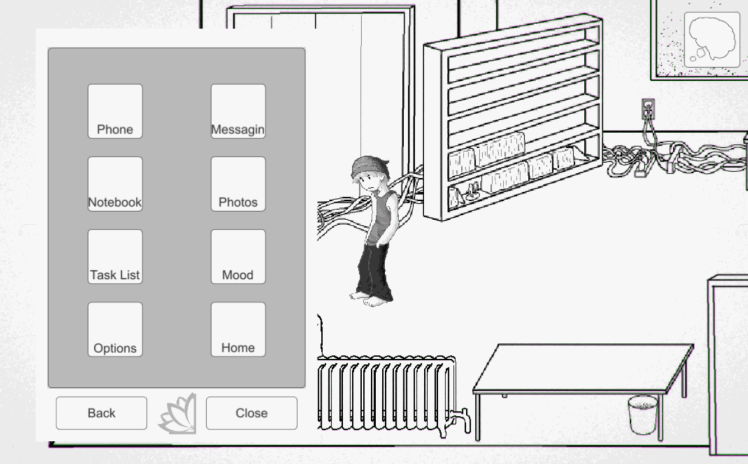
it’s your phone!
the phone has been one of last big systems that’s been needed to be put into the game, and now its in. in a preliminary form, at least.
what the phone is supposed to be, is basically the pause menu. Halting the game, and letting the player check up on a bunch of the other info the game has. Currently, what got done is actually the UI framework for it, as, only 2 of those buttons on the phone actually do something as of now. that is the phone and home buttons.


the UI framework is actually been opposite how I’ve gone about integrating every other system so far, starting with the system management values, then hooking a UI for player feedback later. for the Phone, I did it this way since the UI is so important to it, particularly how it switches between several systems, and because I’m still unsure on how to go about those other systems as of yet.
the two screens that are in were pretty easy to layout. the phone button currently doesn’t do anything but the player can enter numbers into it. the Home button is fully functionally however, as it is the new save system, which leads me to my next point, I refactored the save system!
well, more I refactored how the player interacted with the save system. originally, the player had to go through this long menu of saves, and UI was spawned at runtime, and it was a huge mess on my end, and not very weildly for the player either. so, I refactored it to be a simple 3 buttons, and give the player a quick save ability through their phone.
Now, the idea was a metaphor of save as sleeping, so the player previous had to return to their bed to save, triggering the next day. however, given the plans for levels vs beds are not in the player’s favor (there is just the one), and I don’t want back tracking to be too much of a burden on the player, a quick save ability seemed reasonable. Now the player can save and quit anywhere, as well as start a new day if they so choose, but it will still return them home. We’ll see if design wise, my assumptions are correct, in the future once there is enough physical content to backtrack thru. regardless I do think the UI is an improvement.
another system that got refactored was the choice system. previously, the choice buttons when a choice occurred were also spawned at runtime. As my time in Unity has taught me, that’s a bad idea in Unity. it just continued to cause headaches when it came to resolution and spacing. now the reason I originally did it the way I did, was for the modularity of how many options there could be at 1 time. Having worked in the system for 6 months or so now, that’s more of an edge case, and there is an easier way around it, of just cycling thru it if need be.
So, I made choice buttons a permanent hidden fixture, like the rest of my UI. I picked 4 buttons, as to me, 4 options seems like the most likely max number when dealing with options (option A, option B, option A & B, and neither option), with the option of cycling choices if more are provided (though that part is unfinished). part of refactoring choices also required redoing the layout of the Description UI screen (basically the dialog box), so that screen also got more organized too.
On top of those, I also refactored how the UI control setup worked. My UI control script basically is what turns player movement on and off. previously, it was just an event call, and a integer, functioning on if obtrusive UI was out, preventing player movement. now I updated it, so it knows more exactly what UI screens are out, so if, for whatever reason, a UI screen says its open when it already is, it get ignored.
Finally, I’ve been receiving assistance from my friend and Tools programmer, Daniel Ospina, on improving my workflow with my more complicated systems. Currently hes working on improving the editor for my progression system (the thing that saves all the puzzle and progress data). I asked him to work on it, because, as is, a puzzle with 4 possible states (not started, failed, succeeded, and already over) needed 8 components, and 4 child objects, just to deduce, and display, the players progress to the player. His goal, is get that down to from 8 components to 2, as the 8 is just 4 repeats of 2 components. he is not done, but progress is going nicely on them.
Time Spent –
uh, I dunno. since this idea was a last minute whim, I didn’t clock my hours on anything. should do that going forward. But for now, here’s a rough estimate:
- Phone UI – 6 hours
- Save Refactoring – 3 hours
- Choice Button Refactoring – 3 hours
- UI control refactoring – 2 hours
What to do next-
Well, the Phone UI ain’t done yet. hooking up the Phone buttons to actually display numbers can be done pretty easy, even if calling won’t do anything yet. the others I’ll likely look into where to begin with. Additionally, more debugging needs to be done between all the UI states to remove any unintended behavior.
in bulletined form:
- finish laying Out Phone UI whitboxes
- fix UI states to close certain UI states when 0thers open.
- Integrate Editor progress with my build
- look into set up & data for other phone screens
wow, this report was easier to make than I thought. prolly cuz I love talking about this project of mine. well, catch you guys in a month!
 Jesse Lozano